![logo_merchone-v1.png]](https://service.merchone.com/hs-fs/hubfs/logo_merchone-v1.png?height=24&name=logo_merchone-v1.png)
Before You Start
- Make sure you have the following ready before beginning:
- An active TikTok Shop (Seller Center) account
- Admin access to your TikTok Shop
- An active merchOne account
- Both your merchOne and TikTok stores are US-based
Here's a simplified guide for connecting your merchOne online store with TikTok. You have two main options to connect your TikTok store to our merchOne API:
- through your merchOne API account
- through your TikTok account
Connect your TikTok Store through your merchOne account
Step 1: Go to Stores in Your merchOne Dashboard
- Log in to your merchOne account and navigate to Stores in the left-hand sidebar
- Here you'll see all available integrations, including TikTok Shop
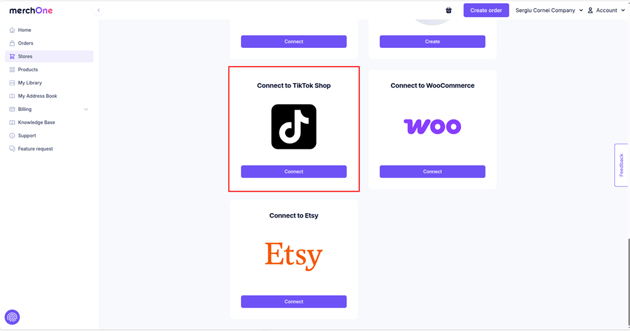
Find the Connect to TikTok Shop button and click Connect. Choose the store to connect with TikTok
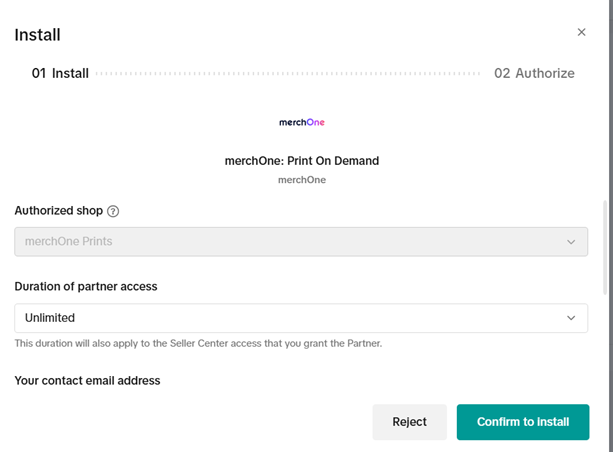
Fill in the following details:
- Authorized shop —Select the correct store from the dropdown list.
- Duration of partner access - Choose how long you want to grant merchOne access (e.g., 90 Days or Unlimited).
- Your contact email address is: Enter the email you'd like associated with this integration.
- Your contact telephone number (optional)
- Confirm to Install
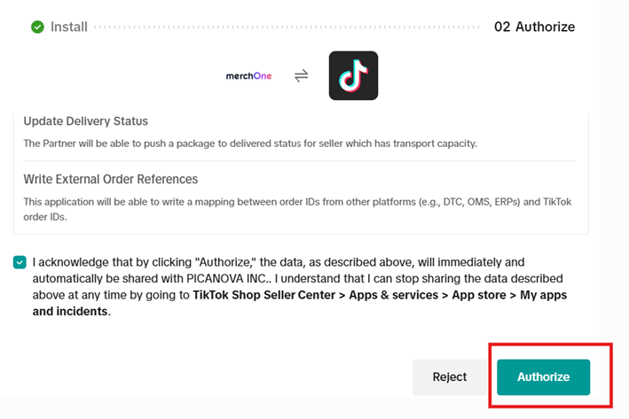
- Then you'll be taken to the second screen (02 Authorize), which lists all the permissions you are granting to merchOne. Read through the permissions carefully. Then check the acknowledgment checkbox at the bottom of the page - this is required before the Authorize button becomes active. Once checked, click Authorize.
You will be redirected to the TikTok Seller Center
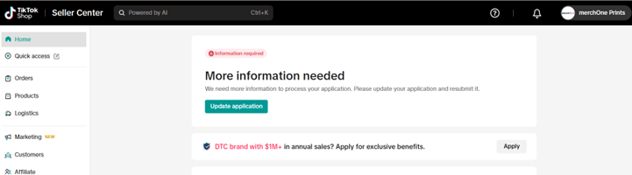
Your TikTok Shop is now connected to merchOne. In your merchOne dashboard - your TikTok store will appear under Stores with a status Connected. From this point, merchOne will automatically sync your products and handle order fulfillment.