![logo_merchone-v1.png]](https://service.merchone.com/hs-fs/hubfs/logo_merchone-v1.png?height=24&name=logo_merchone-v1.png)
Personalized orders often look almost identical, differing only in details like a custom name. These small differences are easy to miss during printing and quality checks, which makes some personalized orders more prone to mix-ups. To prevent this, we’ve added an extra safeguard: a customization text field, filled in automatically or manually depending on your store’s order path. See the article below for the requirements that apply to your merchOne setup.
Please be aware that if the customization text field is missing or filled in incorrectly, merchOne reserves the right to decline reprint or refund requests for affected orders!
-
MANUAL ORDERS
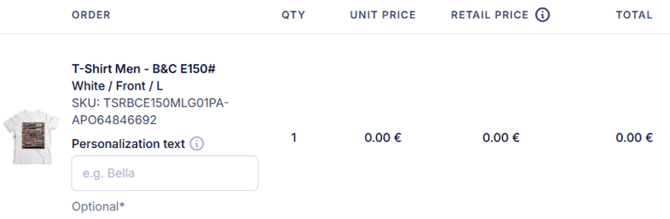
When placing a New order directly from your merchOne account, you will be able to fill in the customization text field during the Order review step. New order → Select store → Select product variant → Enter delivery details → Review order → Personalization text -> checkout.
-
SENDING PERSONALIZATION TEXT WITH YOUR API ORDERS
You can now send the personalization text for each item directly in your order request. This includes names, initials, dates, short messages, and similar text. We use it to check and process your personalized orders more accurately.
What’s changing: A new field, extracted_text, is available on each item in an order. When you include it, we use the text you send instead of trying to read it from the design file.
What you need to do:
-
-
Add extracted_text to every item in the order that carries personalized text.
-
Enter the text exactly as it appears on the product, as plain text.
-
Keep it to a maximum of255 characters
-
Leave the field out for items without personalization.
-
Example:
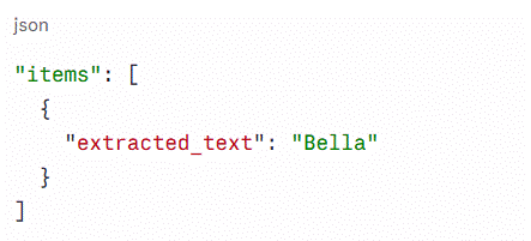
Supported endpoints: The field works on both create-order endpoints.
-
- v1: POST /api/v1/orders
- beta: POST /api/beta/orders
What happens if you don’t send it: If you leave it empty, we’ll still try to read the text from your design automatically, as before. Automatic reading isn’t always reliable, though, especially with decorative fonts, curved text, or busy backgrounds. We strongly recommend sending the text yourself to avoid delays or production errors.
Full API documentation:
3. NEW COLUMN FOR CUSTOMIZATION TEXT IN THE CSV UPLOAD TEMPLATE
If you place orders via CSV upload, the CSV template now includes a new column for customization text. Use it to send the personalized text for each order line, such as names, messages, or dates, directly with your upload.
What you need to do:
-
- Download the latest CSV template.
- Fill in the customization text column for every line that needs personalization.
- Leave the column empty for lines without customization.
- Upload the file following our guidelines.

More information regarding Shopify and other integrations will be provided as soon as possible. It's currently in development stage!